
Have you ever wondered how to achieve a truly seamless and anonymous browsing experience? The secret often lies in the “Tech Stack” you use. While an antidetect browser is powerful on its own, it needs a reliable fuel source—high-quality residential proxies.
Enter 922 S5 Proxy and MostLogin. These two industry leaders, when paired together, offer one of the most reliable solutions for managing multiple digital identities safely. However, setting them up correctly is key to avoiding connection drops and leaks.
What is 922 S5 Proxy?
922 S5 Proxy is a leading residential proxy service provider known for its extensive IP resource pool. Unlike traditional datacenter proxies, 922 S5 offers genuine residential IPs, which are IP addresses assigned by Internet Service Providers (ISPs) to real devices in homes.
Key features include:
- Massive IP Pool: Access to millions of IPs from over 190 countries and regions.
- Granular Targeting: Users can filter proxies by country, city, and even ZIP code to match specific location requirements.
- SOCKS5 Protocol: As the name suggests, it specializes in the SOCKS5 protocol, which offers better performance and security for handling various types of traffic compared to standard HTTP proxies.
- Flexible Billing: It often operates on a model where users purchase valid IPs or traffic that doesn’t expire until used, offering great flexibility.
What is MostLogin?
MostLogin is an advanced antidetect browser designed to protect user privacy by managing browser fingerprints. Every time you surf the web, your browser leaks information (like screen resolution, font lists, and hardware details) that creates a unique “fingerprint.” MostLogin isolates these fingerprints, allowing you to browse without being tracked across different sessions.
Key features include:
- Fingerprint Isolation: Creates unique, independent browser environments (profiles) that do not leak data to each other.
- Profile Management: Easily manage hundreds of unique browser profiles from a single interface.
- Team Collaboration: Allows secure sharing of profiles and environments among team members.
- Automation Support: Compatible with various automation frameworks for advanced users.
Step-by-Step Guide: Configuring 922 S5 Proxy into MostLogin
Integrating these two tools is straightforward. The most stable method is using Port Forwarding. This involves setting up the 922 S5 client to broadcast an IP to a specific port on your computer, which MostLogin then listens to.
Step 1: Configure the 922 S5 Proxy Client
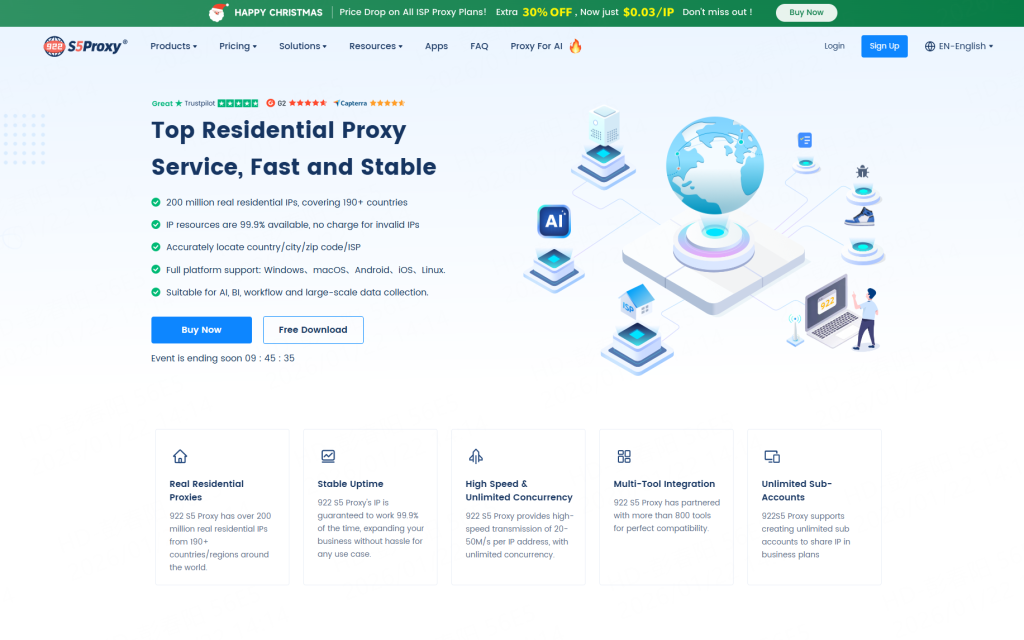
1.Sign up for 922,then downloading the client[Click Here]
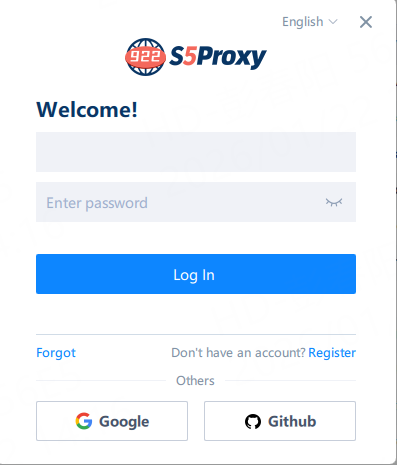
2.Open the 922proxy download and log in
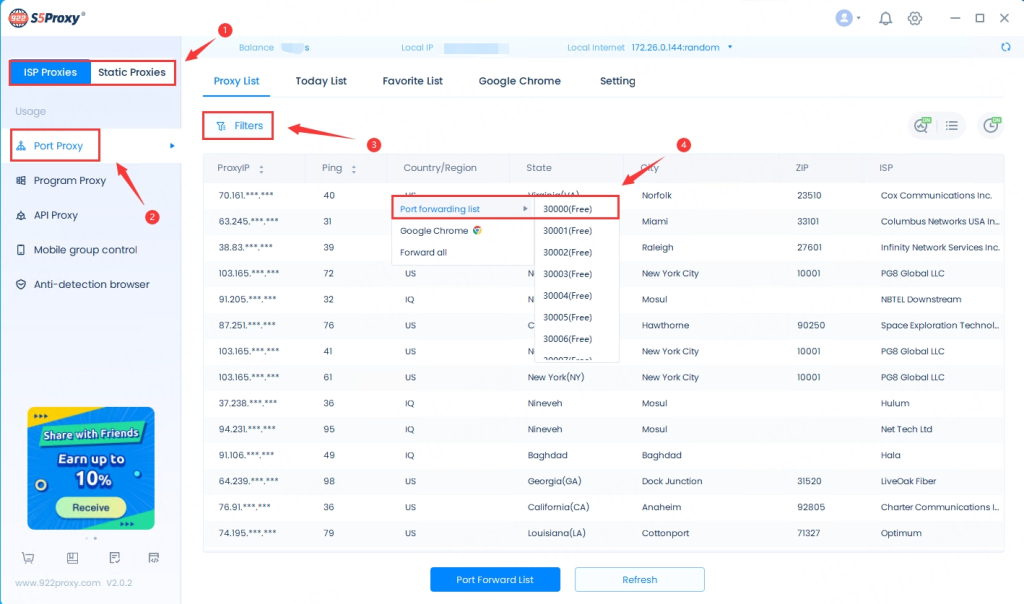
3. Select the “Package Type” purchased, filter and extract the IP address to the “Port”;
If you purchased a traffic package, please refer to the “Account and Password Authentication Extraction Tutorial“.
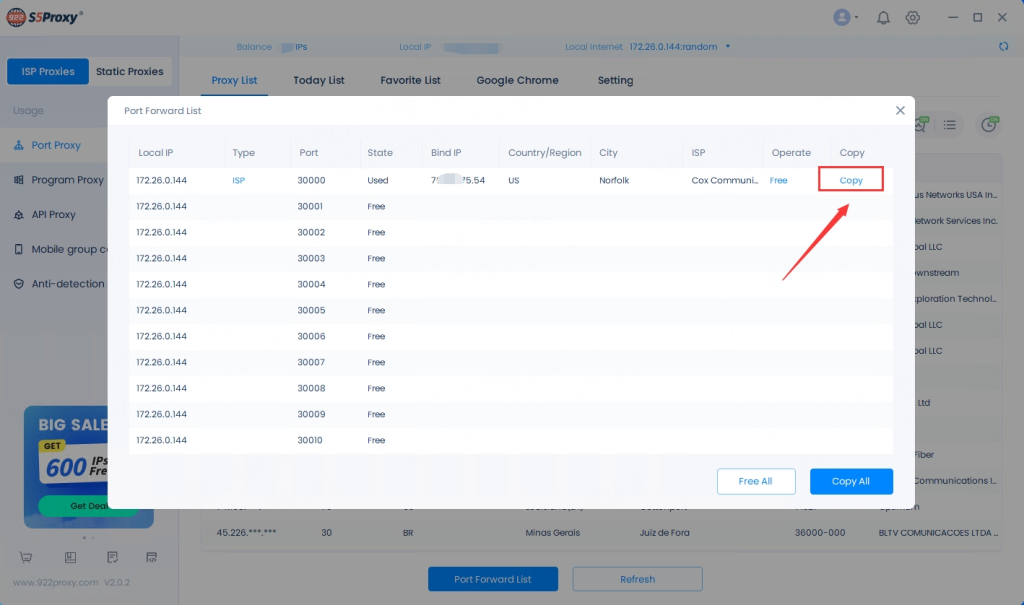
4. Select “Port Forwarding List” and click “Copy”;
Step 2: Set Up the MostLogin Profile
Create a New Profile: Open MostLogin and click on the “Create Profile” button.
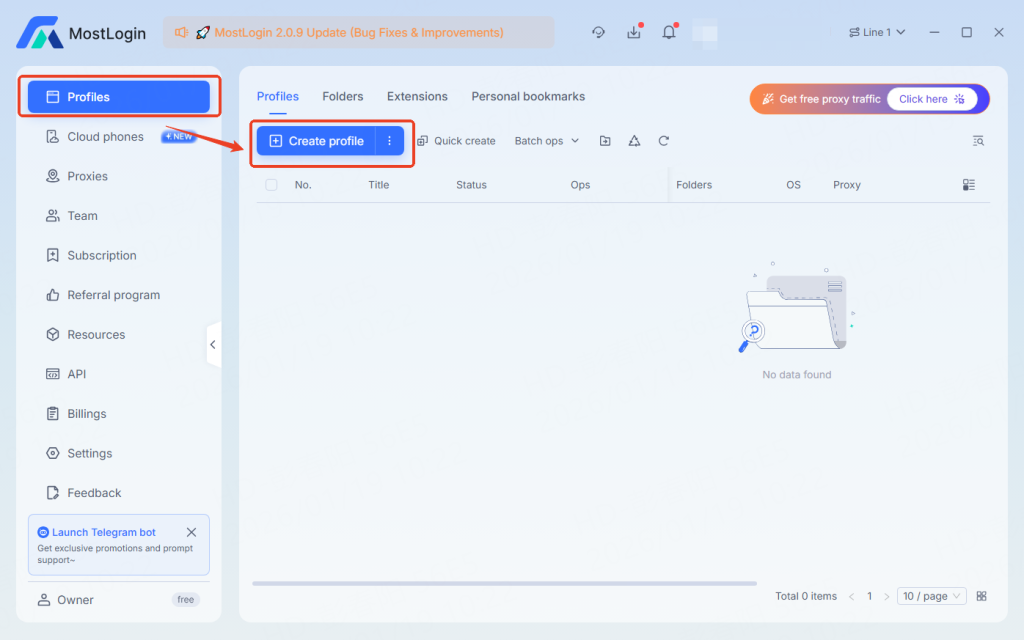
Define Profile Settings: Enter a name for your profile and choose your desired browser (Chrome or Firefox) and Operating System settings.
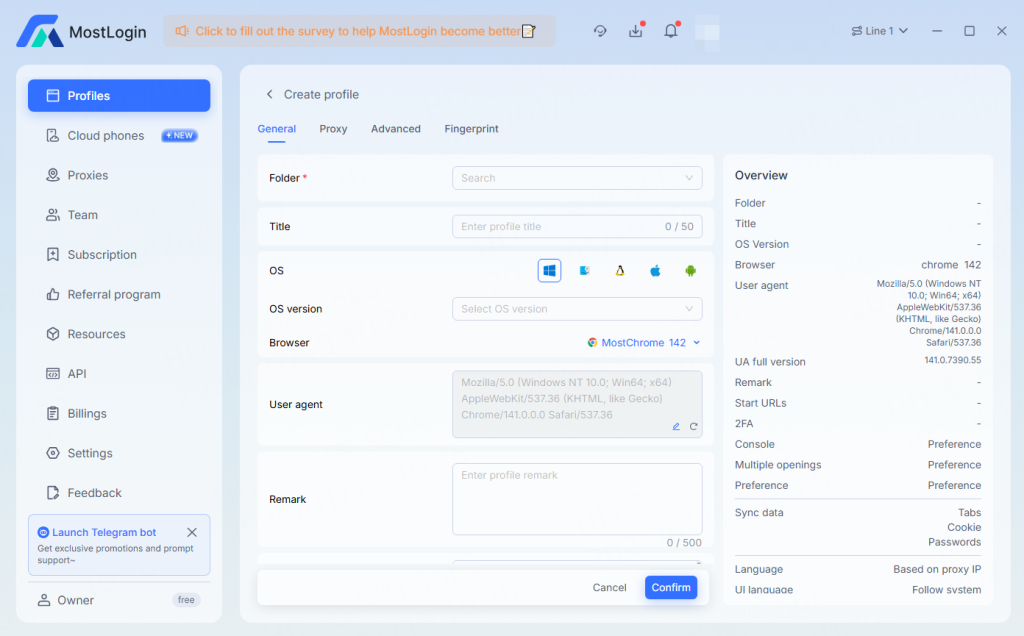
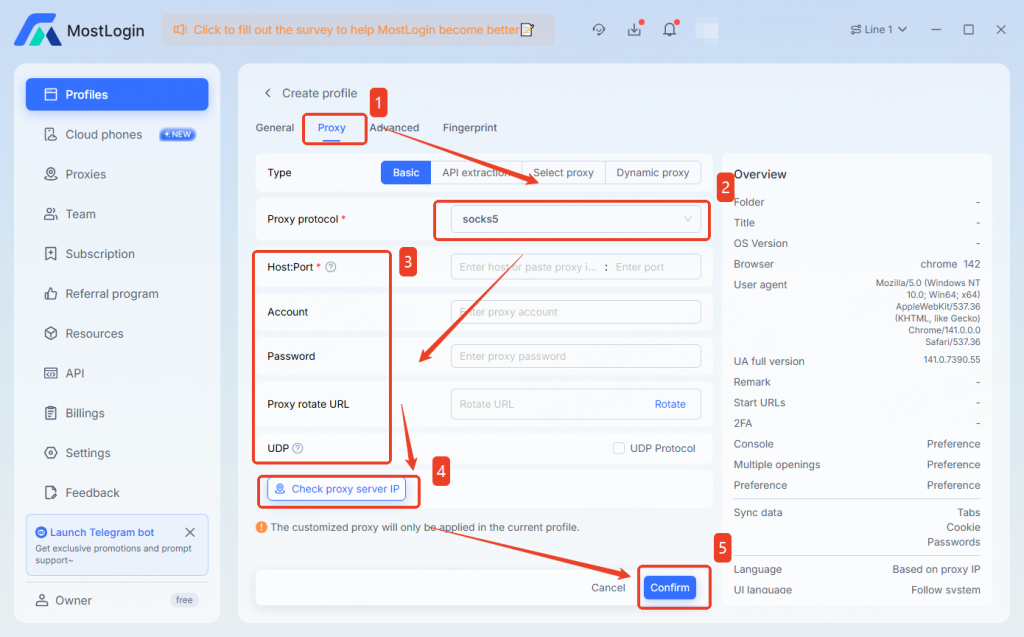
Configure Proxy:
- Scroll to the Proxy settings section.
- Proxy Type: Select SOCKS5 (this is crucial as 922 S5 uses this protocol).
- IP/Host: Enter the Local IP you got from the 922 client (e.g., 127.0.0.1).
- Port: Enter the Port number you selected (e.g., 30000).
- Note: You do not need to enter a Login User or Password when using local port forwarding.
- Verify Connection: Click the “Check Proxy” button.
MostLogin will test the connection. If successful, it will display the location and IP details corresponding to the 922 S5 proxy.
- Finish: Click “OK” or “Start” to launch the browser.
Benefits of Integrating 922 S5 with MostLogin
Combining 922 S5 Proxy with MostLogin offers a synergistic effect that goes beyond using either tool alone:
Enhanced Anonymity: 922 S5 masks your true location with a residential IP, while MostLogin masks your device’s hardware fingerprint. This double-layer protection makes detection nearly impossible.
High Stability: Using the local port forwarding method ensures a direct and stable connection between the proxy software and the browser, reducing connection drops.
Geographic Flexibility: You can create MostLogin profiles that appear to be real users from any city in the world by simply switching the IP in 922 S5.
Simplified Management: Once the port is configured, you can often switch IPs inside the 922 client without changing settings in MostLogin, provided you keep the port number the same.
Conclusion
Configuring 922 S5 Proxy into MostLogin is a powerful step toward securing your online activities. Whether you are focused on privacy protection, managing multiple digital identities, or ensuring secure browsing, this stack provides the reliability and technical sophistication needed in today’s web environment.
By following the steps above, you can establish a secure, isolated, and highly effective browsing setup in minutes.
FAQ
Q: Do I need to keep the 922 S5 client open while using MostLogin?
A: Yes. Since you are using local port forwarding, the 922 S5 application acts as the bridge. If you close it, the internet connection in your MostLogin profile will stop working.
Q: Why should I use SOCKS5 instead of HTTP?
A: SOCKS5 is a lower-level protocol that can handle any type of traffic (TCP/UDP) and does not rewrite data headers. This makes it faster and more anonymous, which is ideal for the 922 S5 and MostLogin integration.
Q: Can I run multiple MostLogin profiles with different IPs?
A: Absolutely. In the 922 S5 client, forward different IPs to different ports (e.g., IP A to port 30000, IP B to port 30001). Then, assign the corresponding ports to different profiles in MostLogin.
Q: The proxy connection failed during the check. What should I do?
A: First, ensure the IP in the 922 S5 client is still active (green light). Residential IPs can expire. If it has expired, select a new IP and forward it to the same port number. Second, ensure your firewall is not blocking the connection.
Your IP address functions like a digital fingerprint, visible to every website you visit. To protect this sensitive information, an anonymous proxy serves as an essential barrier. Unlike a standard connection, an anonymous proxy acts as an intermediary, routing your traffic through a separate server to ensure your request is delivered while your true identity remains hidden.
This guide examines the mechanics of an anonymous proxy, its strategic uses, and how 922 S5 Proxy utilizes advanced residential infrastructure to provide a secure, high-performance connection.
What is an Anonymous Proxy?
An anonymous proxy is a server that acts as an intermediary between your computer and the internet. When you use an anonymous proxy, your online requests are sent through the proxy server, hiding your actual IP address. This process helps mask your identity and allows for secure communication with websites without revealing your personal information.
Unlike standard proxies, which may still expose your real IP address to certain websites or applications, an anonymous proxy offers an extra layer of protection by completely masking your identity. This can be particularly useful for individuals concerned about their privacy or businesses that need to protect their sensitive data.
How Does an Anonymous Proxy Work?
The way an anonymous proxy works is quite simple. When you make a request to visit a website, your request is first directed to the proxy server. The proxy server then forwards the request to the target website, effectively masking your original IP address. The website interacts with the proxy server, unaware of your actual IP. This creates a layer of privacy, ensuring that your identity remains hidden from the site you’re visiting.
Additionally, the proxy server can be configured to filter and block unwanted content or malicious websites, offering enhanced security for your browsing experience.
Benefits of Using an Anonymous Proxy
Using an anonymous proxy comes with several advantages:
- Enhanced Privacy: Your real IP address remains hidden, offering a higher level of security when browsing.
- Bypassing Geo-restrictions: Access content from restricted regions without the usual limitations.
- Secure Web Scraping: An anonymous proxy ensures that web scraping activities remain undetected and efficient.
- Avoiding Tracking: Websites and advertisers cannot track your online behavior because your true identity is concealed.
One powerful tool that can help you achieve all these benefits is 922 S5 Proxy. With its vast network of real residential IPs across multiple locations, 922 S5 Proxy can seamlessly integrate with your browsing habits and ensure a high level of privacy. Whether you’re conducting research, scraping data, or just browsing the internet, 922 S5 Proxy ensures that your identity stays secure and your browsing speed remains optimal.
Use Cases for Anonymous Proxies
There are many scenarios where using an anonymous proxy can be beneficial:
- Data Collection: Businesses can use anonymous proxies to gather data from various websites without revealing their true identity.
- Accessing Restricted Content: Users in different regions can bypass geo-blocks to access restricted content.
- Enhanced Security for Online Transactions: Online shoppers can benefit from an anonymous proxy to reduce the risk of fraud when making purchases.
For these use cases, 922 S5 Proxy provides a robust and reliable solution. With its high-speed connections and 99.99% success rate, it can ensure smooth and secure browsing for all your online needs.
Conclusion
In conclusion, an anonymous proxy serves as a powerful tool to protect your privacy online and enhance your browsing experience. By masking your real IP address, it allows you to surf the web securely and access restricted content. For the most reliable and secure browsing experience, consider integrating 922 S5 Proxy into your online activities. With its premium features and extensive IP network, 922 S5 Proxy is the perfect solution to meet all your privacy and security needs.
Frequently Asked Questions (FAQ)
1. What is the difference between an anonymous proxy and a regular proxy?
An anonymous proxy fully hides your real IP address, providing more privacy and security compared to regular proxies, which might still expose your identity to certain websites or services. Anonymous proxies are specifically designed to protect users’ privacy by ensuring that their true IP address is never revealed.
2. Can an anonymous proxy be used for web scraping?
Yes, an anonymous proxy is an ideal solution for web scraping. It helps you gather data from websites without revealing your IP address, reducing the risk of detection and blocking. Using a reliable proxy service, like 922 S5 Proxy, ensures that your web scraping activities are both efficient and secure.
3. Is using an anonymous proxy legal?
In most cases, using an anonymous proxy is legal. However, it’s essential to understand that the legality can vary depending on how you use it. For example, bypassing geo-restrictions to access content might violate some website terms of service. Always ensure you’re complying with local laws and website policies.
4. Does using an anonymous proxy slow down my internet speed?
Using an anonymous proxy may introduce a slight delay in your internet speed because your traffic is routed through a proxy server. However, premium proxies like 922 S5 Proxy offer high-speed connections, ensuring minimal impact on browsing performance.
5. How can I choose the best anonymous proxy for my needs?
When choosing an anonymous proxy, consider factors like the proxy provider’s reliability, the number of available IP addresses, geographic coverage, and the speed of the connections. 922 S5 Proxy is a top-tier solution, offering a large pool of residential IPs across multiple locations, ensuring optimal performance and security.
6. Can an anonymous proxy protect me from cyber threats?
While an anonymous proxy can help protect your privacy by masking your IP address, it does not provide comprehensive protection against all cyber threats. To ensure full protection, it’s recommended to use an anonymous proxy in combination with other security measures, such as encryption and antivirus software.
Free proxies may seem like an appealing option for those looking to maintain their privacy or access restricted content without paying a cent. However, their convenience comes at a cost. In this article, we will explore the risks and dangers associated with free proxies and discuss better alternatives, including 922 S5 Proxy, a premium paid solution that guarantees superior security, performance, and reliability.
Introduction: The Growing Popularity of Free Proxies
With the rise of the internet, free proxies have become a popular choice for users seeking anonymity or geo-unblocking services. They promise to provide an easy way to access restricted websites or mask online activities. But are they truly safe? While free proxies might save you money, they come with significant risks that are often overlooked. Understanding these risks can help you make more informed decisions about your online privacy and security.
What Are Free Proxies and How Do They Work?
Free proxies function by acting as intermediaries between a user’s device and the websites they visit. When using a proxy, your traffic is routed through the proxy server, which masks your IP address and appears as the origin of the request. This allows users to browse websites anonymously or bypass geographical restrictions.
However, while they may offer temporary benefits like unblocking content or hiding your IP address, free proxies often lack the reliability and safety measures of paid alternatives.
The Risks of Using Free Proxies: What You Need to Know
Using free proxies comes with several risks that could compromise your data and security:
Data Breaches:
Free proxy providers might log your browsing activity or even sell your data to third-party advertisers. This can put your personal information at risk.
Malware and Viruses:
Some free proxy services may infect your device with malware or viruses, leading to data theft or system damage.
Slow Speeds and Unreliable Connections:
Free proxies often have overcrowded servers, resulting in slow speeds and frequent disconnects. This can be frustrating for users trying to stream content or access real-time data.
Lack of Customer Support:
Since most free proxy services don’t offer reliable customer support, any issues or technical problems may go unresolved, leaving you vulnerable to security threats.
Why Are Free Proxies Unreliable for Serious Use?
Free proxies often fail to provide the consistency and reliability required for serious use. Whether you’re conducting business, performing web scraping, or simply streaming content, free proxies can cause more harm than good.
Unstable Connections:
Many free proxy services suffer from poor infrastructure and low server uptime, leading to frequent disconnections or inconsistent browsing speeds.
Limited Security:
Free proxies may lack essential security features, such as data encryption, putting your online activities at risk.
No Technical Support:
If your free proxy malfunctions, you’re often left to figure out the problem on your own. For more critical tasks, this lack of support can lead to wasted time and potential security risks.
Better Alternatives: Paid Proxies for Enhanced Security
While free proxies are tempting, they are rarely suited for serious or sensitive tasks. Paid proxies, on the other hand, offer significant advantages in terms of both performance and security:
Faster Speeds:
Paid proxies generally provide faster, more reliable connections, making them ideal for streaming, gaming, and business applications.
Better Security:
Paid services invest in advanced encryption technologies to ensure that your data remains secure from potential threats.
Dedicated Customer Support:
If you encounter any issues with a paid proxy, you can rely on customer support teams that are available to assist you promptly.
Access to More Locations:
Paid proxies typically offer a wider range of IP addresses and geographical locations, giving you more flexibility and choice in your online activities.
How 922 S5 Proxy Outperforms Free Proxies
922 S5 Proxy is an excellent paid alternative for those seeking a secure, fast, and reliable proxy solution. Here’s how it outperforms free proxies:
Global Coverage:
922 S5 Proxy offers over 200 million real residential IPs across 190+ countries, providing users with robust and varied access to global content.
99.9% Success Rate:
Unlike free proxies, which often fail to establish reliable connections, 922 S5 Proxy boasts a 99.9% success rate, ensuring that users can access content without interruptions.
Speed and Efficiency:
With sub-0.5s response times, 922 S5 Proxy provides lightning-fast browsing speeds, perfect for demanding tasks like streaming or web scraping.
Reliable Customer Support:
922 S5 Proxy offers round-the-clock customer support to assist users in case of issues or concerns, something free proxies often lack.
Data Protection:
The service prioritizes user privacy by ensuring strong encryption and secure connections to prevent data breaches or exposure.
How 922 S5 Proxy Enhances Online Security and Performance
One of the main advantages of 922 S5 Proxy is the high level of security it provides:
Data Encryption:
922 S5 Proxy uses advanced encryption techniques to protect your sensitive data from cyber threats. This ensures that your browsing activity remains private and secure, unlike free proxies, which may expose you to risks.
Malware Prevention:
By utilizing a premium service, you minimize the risk of encountering malware, which is more prevalent in free proxy services. 922 S5 Proxy offers clean, secure connections for a safer online experience.
Reliable Performance:
With high-speed servers and a global network of IPs, 922 S5 Proxy ensures that you can perform your tasks smoothly, whether you’re conducting research, managing social media, or scraping data.
Case Studies: How 922 S5 Proxy Has Helped Businesses and Individuals
922 S5 Proxy is trusted by businesses and individuals alike for its high performance and reliability. Here are some ways it’s helped users:
- Web Scraping: Businesses use 922 S5 Proxy to collect valuable data from websites without encountering bans or IP blocks, which are common with free proxies.
- Ad Verification: Marketing companies rely on 922 S5 Proxy to verify ads in different locations around the world to ensure their ads are being displayed correctly.
- Social Media Management: Social media managers use 922 S5 Proxy to manage multiple accounts without the risk of account bans, a frequent issue with free proxies.
Conclusion: Are Free Proxies Safe? Why Paid Proxies Are the Smart Choice
In conclusion, while free proxies may offer some temporary benefits, they come with significant risks that can compromise your data and online security. The unpredictable speeds, lack of privacy protection, and potential exposure to malware make free proxies unsuitable for serious users.
Choosing a paid solution like 922 S5 Proxy offers you enhanced security, faster speeds, and reliable performance, making it the smarter choice for anyone seeking a safer online experience.
Frequently Asked Questions (FAQs)
Are free proxies safe to use?
Free proxies are not secure and often expose users to data breaches, malware, and unreliable connections. Paid proxies are a safer option.
Why should I choose paid proxies like 922 S5 Proxy?
Paid proxies like 922 S5 Proxy offer greater security, faster speeds, reliable connections, and customer support, ensuring a better experience than free proxies.
How can 922 S5 Proxy improve my browsing experience?
922 S5 Proxy provides faster speeds, secure connections, and global coverage, making it ideal for both business and personal use.
In 2026, Airtel Proxy serves two critical purposes: it is the APN setting required for high-speed mobile internet, and a powerful “Mobile IP” resource for data scraping. Whether you are fixing a slow connection or building an automated crawler, correct configuration is essential.
Outdated settings lead to network lag and blocked requests. This guide provides the latest Airtel APN parameters for instant connectivity and demonstrates how to leverage trusted Airtel mobile IPs for enterprise automation using 922 S5 Proxy.
Part 1: Airtel Proxy Settings for High-Speed Internet
For mobile users experiencing slow connectivity or data interruptions, the issue often lies within the device’s network configuration. The Proxy and Port settings act as the gateway between your device and the wider internet.
Standard APN Configuration (2026 Update)
To ensure optimal performance on the Airtel network, verify that your device is using the most current settings. Incorrect parameters can lead to latency or complete signal loss.
Manual Configuration Steps:
- Navigate to Settings > Mobile Networks.
- Select your Airtel SIM.
- Tap on Access Point Names (APN).
- Create a New APN and enter the following details:
- Name: Airtel Internet
- APN: airtelgprs.com
Proxy: Not Set (Keep blank for default dynamic routing)
- Port: 8080 (Or keep blank)
- Username: Not Set
- Password: Not Set
- Server: www.google.com (Optional, for better routing)
- MMSC: Not Set
- Authentication Type: PAP or CHAP
- APN Protocol: IPv4/IPv6
Note: In most modern devices, leaving the “Proxy” and “Port” fields blank is recommended. The network automatically assigns a dynamic proxy to manage traffic flow efficiently. Hard-coding a specific IP address in these fields can sometimes slow down 5G speeds.
Part 2: Understanding Airtel Mobile Proxies for Business
Beyond simple phone settings, Airtel Proxies act as a gold standard in the world of data extraction. These are known as Mobile Residential IPs.
What is a Mobile Proxy?
A mobile proxy routes internet traffic through a device (like a smartphone or tablet) connected to a cellular network (3G, 4G, or 5G). When a scraper or automation script uses an Airtel mobile proxy, the target website sees the request as coming from a legitimate mobile user on the Airtel network, rather than a data center.
Why Are They Valuable?
High Trust Score:
Websites trust mobile carrier IPs because they are shared by thousands of real human users. Blocking one mobile IP could affect legitimate customers, so servers are hesitant to block them.
Dynamic Rotation:
Cellular networks frequently rotate IP addresses for devices. This natural rotation is perfect for web scraping, as it allows for high-volume data collection without hitting rate limits.
Part 3: Enterprise Solutions with 922 S5 Proxy
For businesses that need to leverage the power of trusted carrier IPs—such as those from Airtel—simply changing phone settings is not enough. You need a scalable infrastructure. This is where 922 S5 Proxy becomes a critical asset.
922 S5 Proxy provides an enterprise gateway to millions of residential and mobile IPs, including specific carrier pools.
How 922 S5 Proxy Utilizes Carrier IPs
1. Access to Real ISP Resources
922 S5 Proxy does not use artificial data center IPs. Instead, it routes traffic through genuine residential and mobile devices. This means your automation tasks can utilize IPs assigned by major carriers like Airtel. This authentic connection ensures that your requests are viewed as organic user behavior.
2. Precise Geographic Targeting
If your data project requires information specific to a region—for example, verifying ad placements in Mumbai or checking search results in Delhi—922 S5 Proxy allows you to filter IPs by country, city, and even ISP. You can specifically target the “Airtel” ISP within the dashboard to ensure your traffic originates from the correct network environment.
3. Enhanced Success Rates
Because mobile IPs from carriers like Airtel have high reputation scores, using them via 922 S5 Proxy significantly reduces the number of CAPTCHAs and interruptions your scraper encounters. This efficiency is vital for large-scale e-commerce monitoring or social media analysis.
Technical Integration Example
Integrating a carrier-specific proxy from 922 S5 Proxy into a Python script is seamless.
downloadcontent_copy
expand_less
import requests
# Configuration for 922 S5 Proxy# Assuming you have filtered for ‘Airtel’ or ‘India’ IPs in the client
proxy_host = “proxy.922proxy.com”
proxy_port = “8000”
proxy_user = “your_username”
proxy_pass = “your_password”
proxies = {
“http”: f”http://{proxy_user}:{proxy_pass}@{proxy_host}:{proxy_port}”,
“https”: f”http://{proxy_user}:{proxy_pass}@{proxy_host}:{proxy_port}”,
}
try:
# Target a site to verify the IP ISP
response = requests.get(“http://ip-api.com/json”, proxies=proxies, timeout=10)
data = response.json()
print(f”Current IP: {data.get(‘query’)}”)
print(f”ISP: {data.get(‘isp’)}”) # Should reflect the carrier (e.g., Bharti Airtel)
except Exception as e:
print(f”Connection Error: {e}”)
Conclusion
Whether you are a consumer adjusting APN settings for better video streaming or a developer configuring a scraping pipeline, the Airtel Proxy infrastructure plays a pivotal role.
For everyday users, keeping settings updated ensures a smooth 5G experience. For professionals, leveraging the trust of the Airtel network via 922 S5 Proxy offers a strategic advantage. It provides the stability and legitimacy needed to access data in an increasingly guarded digital ecosystem. By utilizing high-quality residential and mobile IPs, businesses can ensure their operations remain efficient and uninterrupted in 2026.
Frequently Asked Questions (FAQ)
Q1: What is the port number for Airtel Proxy?
For manual APN configurations, the standard port is 8080. However, for most modern 5G smartphones, it is best to leave the proxy and port fields blank to allow the network to assign them dynamically.
Q2: Why is my internet slow even with correct settings?
Network congestion or signal strength often causes slow speeds. If settings are correct, try toggling “Airplane Mode” on and off to reset the network latch.
Q3: Can I use Airtel IPs for web scraping?
Yes. Airtel IPs are considered mobile residential IPs and are highly effective for scraping. Using a service like 922 S5 Proxy allows you to access these IPs programmatically for large-scale tasks.
Q4: Is it safe to change APN settings?
Yes, it is safe. If you enter incorrect settings, you simply will not connect to the internet. You can always select “Reset to Default” in your mobile network settings to restore the original configuration.
Editor’s Key Takeaways (Quick Summary)
- Best Overall Value: 922 S5 Proxy – Known for its massive 200M+ IP pool and unique “Non-Expiring” balance model.
- Best for Enterprise: Bright Data – Powerful but expensive compliance tools for Fortune 500s.
- Best for Speed: Decodo – Low latency infrastructure ideal for real-time tasks.
- The 2026 Trend: The shift from monthly subscriptions to flexible, pay-as-you-go residential web scraping proxy services is accelerating.
In the data-driven landscape of 2026, businesses rely heavily on accurate market insights. Whether you are monitoring e-commerce pricing, aggregating travel fares, or conducting market research, the ability to gather public data efficiently is paramount. This is where a high-performance web scraping proxy becomes an essential tool for developers and data scientists.
Choosing the right web scraping proxy service can determine the success of your data projects. A robust proxy network ensures high availability, speed, and the ability to manage requests without connection drops. This guide explores the best solutions available this year, with a special focus on how 922 S5 Proxy serves as a premier choice for modern data extraction needs.
Our Review Methodology: How We Tested
To ensure this guide provides actionable value, we evaluated the top 10 web scraping proxy providers based on a rigorous 7-day stress test. Our criteria included:
- Success Rate: Measuring the percentage of successful connections to major e-commerce platforms (Target: >99%).
- Response Time: Average latency in milliseconds during peak hours.
- Pool Integrity: Verifying if the IPs are genuinely residential versus datacenter-masked.
- Scalability: Testing the web scraping proxy performance under high concurrency (500+ simultaneous threads).
Spotlight: Why 922 S5 Proxy Leads the Pack in 2026
Among the top contenders, 922 S5 Proxy has emerged as a standout solution for professionals seeking a premium web scraping proxy. It addresses the common pain points of data collection—wasted budget and limited geographic reach—by offering an infrastructure designed for stability.
Here is why 922 S5 Proxy is our top recommendation for 2026:
1. Unmatched Global Resource Availability
922 S5 Proxy provides access to over 200 million residential IPs across 190+ countries and regions. For users needing a web scraping proxy that offers specific regional targeting, this vast network allows you to select specific cities or zip codes. This ensures that the data you extract is relevant to the exact market you are analyzing.
2. The “Non-Expiring” Balance Model (Top Feature)
Most competitors force you into a “use it or lose it” monthly subscription. 922 S5 Proxy disrupts this model. The IPs or data traffic you purchase never expire. This makes it the most cost-effective web scraping proxy for projects with fluctuating data needs. You only pay for what you actually use.
3. SOCKS5 Protocol Optimization
While HTTP proxies are common, the SOCKS5 protocol is more versatile. 922 S5 Proxy specializes in SOCKS5, which supports both TCP and UDP traffic. This ensures faster data transmission and better compatibility with complex data extraction pipelines.
[Explore 922 S5 Proxy Plans & Get Non-Expiring Balance]
Comparison: 922 S5 vs. Top Web Scraping Proxy Competitors
To help you make an informed decision, we have compared the technical specifications of the leading providers in 2026.
| Provider | IP Pool Size | Protocols | Pricing Model | Best Use Case |
| 922 S5 Proxy | 200M+ Res. | SOCKS5 / HTTP | Non-Expiring (Pay-as-you-go) | High Value & Scalability |
| Bright Data | 72M+ | All Protocols | Monthly Subscription | Enterprise Compliance |
| Decodo | 65M+ | HTTP / SOCKS5 | Monthly Subscription | Speed & Ad Verification |
| Oxylabs | 177M+ | All Protocols | Monthly Subscription | Corporate Scraping |
| IPRoyal | 32M+ | HTTP / SOCKS5 | Non-Expiring | Budget / Small Scale |
| NetNut | 52M+ | HTTP / SOCKS5 | Subscription | Direct ISP Connectivity |
Detailed Breakdown of Alternatives
1. Bright Data
Bright Data remains a giant in the industry. Its web scraping proxy tools come with extensive compliance features, making it ideal for publicly traded companies. However, for smaller teams, the high cost per GB and complex dashboard can be a barrier compared to the user-friendly nature of 922 S5.

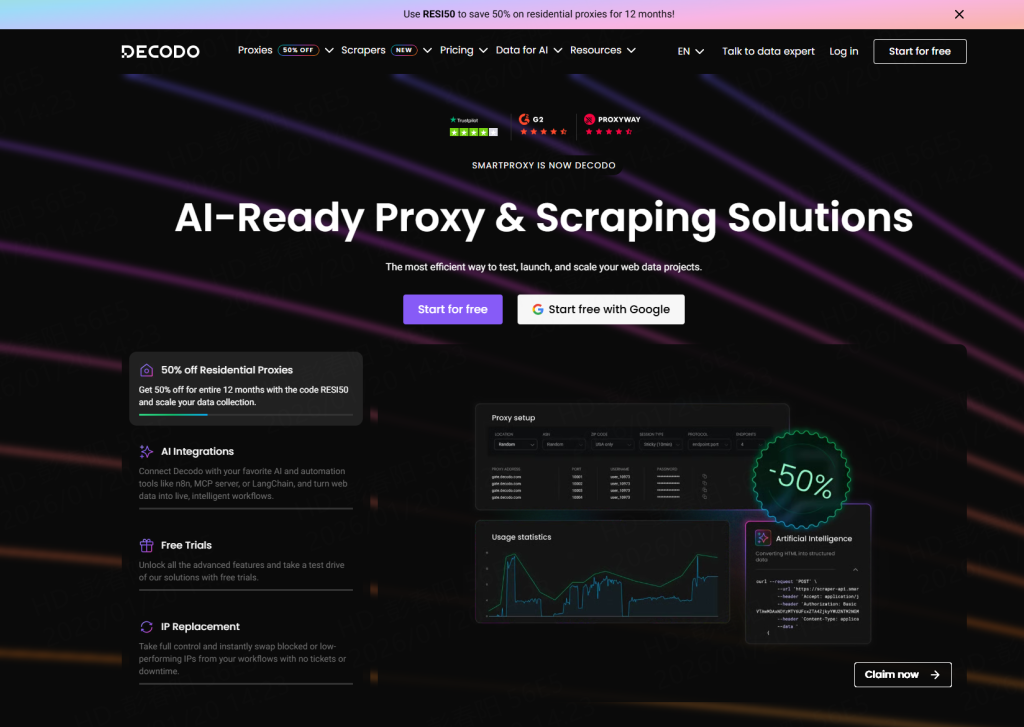
2. Decodo (formerly Smartproxy)
Decodo offers a high-speed web scraping proxy network. In our tests, it showed excellent response times for e-commerce scraping. While it performs well, it lacks the flexible “non-expiring” billing model that makes 922 S5 so attractive for intermittent projects.
3. Oxylabs
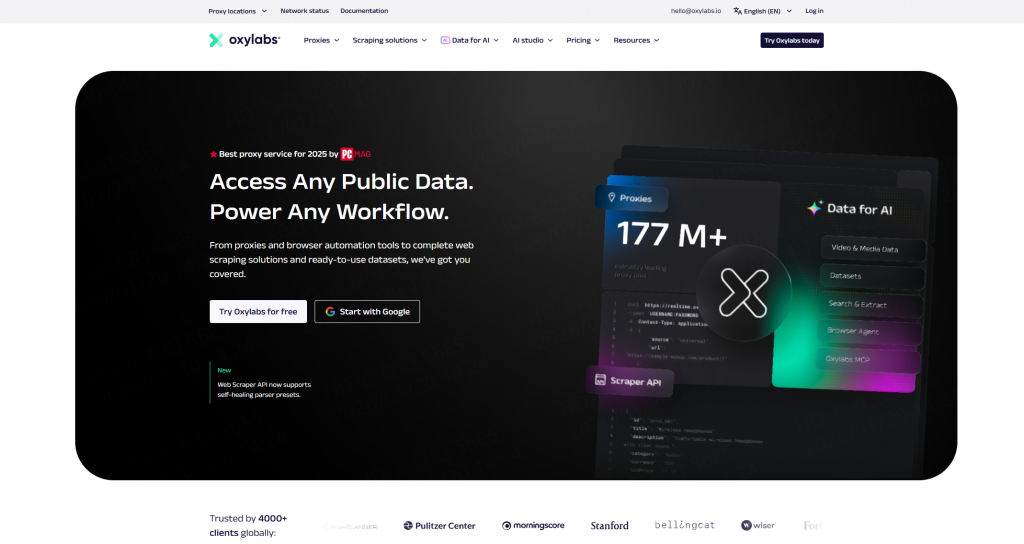
Oxylabs is a direct competitor in terms of scale, offering a massive pool similar to 922 S5. Their web scraping proxy is powerful and supports AI-driven parsing. However, their pricing structure is geared strictly towards enterprise clients with large monthly minimums.
4. Webshare
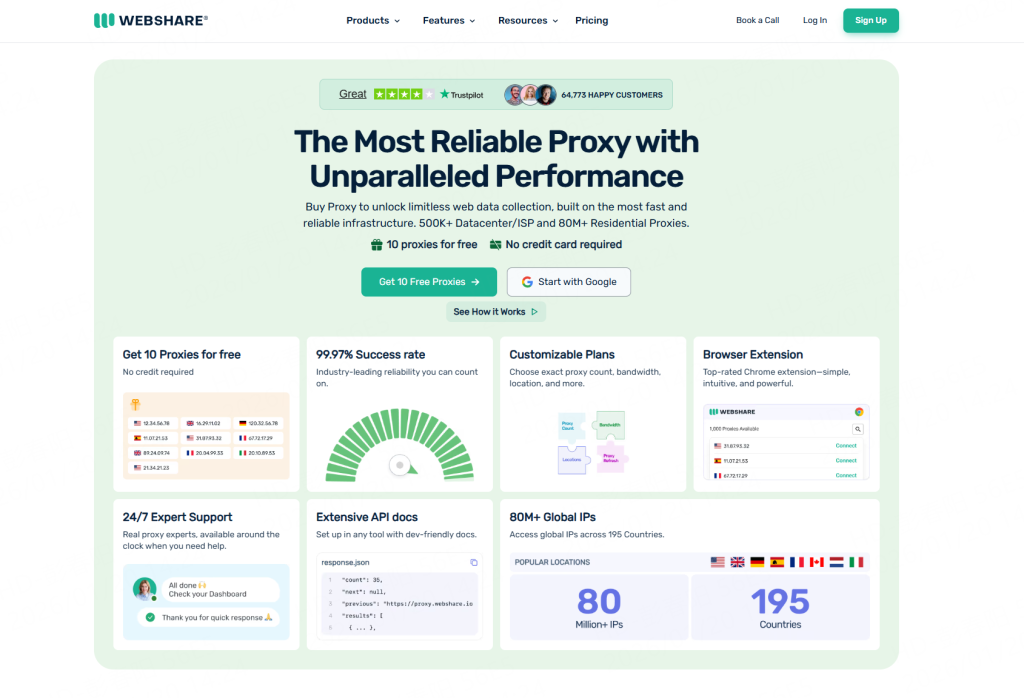
For those just starting, Webshare offers a low-cost entry point. While their web scraping proxy is affordable, the success rate on difficult targets is generally lower than premium residential networks like 922 S5 or Oxylabs.
⚠️ 3 Common Pitfalls When Using a Web Scraping Proxy
Even the best web scraping proxy cannot save a poorly configured script. Avoid these mistakes to ensure smooth data extraction:
Ignoring Protocol Mismatch:
Ensure your scraper is configured correctly for SOCKS5 if you are using it. Mixing HTTP headers with a SOCKS5 connection often leads to timeouts.
Overlooking Rotation Settings:
For high-volume scraping, you must set your web scraping proxy to rotate IPs automatically. Using a static IP for thousands of requests will lead to connection stability issues.
Neglecting Error Handling:
Always build retry logic. If a connection fails (which happens even with premium proxies), your script should automatically switch to a new IP from the 922 S5 pool without crashing.
Conclusion: Which Web Scraping Proxy Should You Choose?
Selecting the best web scraping proxy in 2026 is about balancing performance, pool size, and budget efficiency.
- If you need enterprise-grade compliance and have a large budget, Bright Data is a strong contender.
- If you need speed for real-time bidding, Decodo is worth a look.
Winner: If you want the best balance of price, massive 200M+ IP resources, and a flexible non-expiring model, 922 S5 Proxy is the superior choice.
By integrating a high-quality web scraping proxy like 922 S5 into your workflow, you ensure that your data pipeline remains robust, efficient, and ready to deliver actionable insights.
❓ FAQ: Web Scraping Proxies
Q: Why is a residential web scraping proxy better than a datacenter one?
A: A residential web scraping proxy uses IPs assigned to real devices (like home Wi-Fi), making the traffic appear organic. Datacenter IPs are easily identified as coming from cloud servers, which often leads to access restrictions on strict websites.
Q: Can I use 922 S5 Proxy with browser automation tools?
A: Yes. 922 S5 integrates seamlessly with browser automation tools like Selenium, Puppeteer, and Playwright, as well as anti-detect browsers like Multilogin and AdsPower.
Q: How does geolocation targeting work?
A: Premium services like 922 S5 allow you to filter the web scraping proxy connection by Country, City, or ISP. This is crucial for verifying local search results (SERP) or viewing region-specific e-commerce pricing.
Q: Is the 922 S5 balance truly non-expiring?
A: Yes. Unlike monthly subscriptions that reset every 30 days, the IPs or traffic you purchase from 922 S5 remain in your account until you use them, providing maximum ROI.
Stop wasting human potential on manual data entry. Web scraping using Python allows you to automate the extraction of pricing, contacts, and market trends with precision. It is efficient, scalable, and with the right setup, undetectable.
In this guide, we provide a complete walkthrough: from installing your first library to overcoming network blocks using high-quality residential IPs from 922 S5 Proxy. Let’s turn the web into your personal database.
Why Choose Python for Web Scraping?
Before diving into the code, it is important to understand why web scraping using Python is preferred over other languages like JavaScript (Node.js) or Java.
- Simplicity: Python syntax reads like English. This lowers the barrier to entry, allowing developers to focus on the data extraction logic rather than complex syntax rules.
- Rich Ecosystem: Python offers a library for every stage of the scraping lifecycle. Requests handles the networking, BeautifulSoup handles the parsing, and Pandas handles the data organization.
- Community Support: In 2026, the Python community is vast. If you encounter a specific challenge while building a scraper, chances are there is already a solution or documentation available.
Essential Libraries for Web Scraping Using Python
To perform web scraping using Python effectively, you need to be familiar with the core toolkit. Here are the top libraries used in 2026:
1. Requests
The requests library is the foundation of most Python scrapers. It allows you to send HTTP/1.1 requests extremely easily. It is not a parser; its job is simply to retrieve the HTML content from a server.
2. Beautiful Soup (bs4)
Beautiful Soup is a parsing library. It takes the raw HTML returned by requests and turns it into a navigable tree structure. It is excellent for beginners and works well for static websites.
3. Scrapy
Scrapy is not just a library; it is a full-scale framework. It is designed for large-scale web scraping using Python. It handles requests asynchronously, meaning it can process multiple pages simultaneously, making it incredibly fast.
4. Selenium and Playwright
Modern websites often use JavaScript to load content. Standard libraries cannot see this data. Selenium and Playwright are browser automation tools that can render JavaScript, allowing you to scrape dynamic content just as a user sees it in a browser.
Step-by-Step Tutorial: Building Your First Scraper
Let’s put theory into practice. We will build a simple tool for web scraping using Python to extract a product title and price from a mock e-commerce page.
Prerequisites:
Ensure you have Python installed. Then, install the necessary packages via terminal:
pip install requests beautifulsoup4
The Code
Create a file named scraper.py and input the following code:
import requestsfrom bs4 import BeautifulSoupimport time
def scrape_product_data(url):
# 1. Define headers to mimic a legitimate browser
headers = {
‘User-Agent’: ‘Mozilla/5.0 (Windows NT 10.0; Win64; x64) AppleWebKit/537.36 (KHTML, like Gecko) Chrome/120.0.0.0 Safari/537.36’
}
try:
# 2. Send the HTTP Request
response = requests.get(url, headers=headers, timeout=10)
# Check if the request was successful
if response.status_code == 200:
# 3. Parse the content
soup = BeautifulSoup(response.content, ‘html.parser’)
# 4. Extract Data (Selectors will vary by website)
# Example selectors:
product_title = soup.find(‘h1′, class_=’product-title’).text.strip()
product_price = soup.find(‘span’, class_=’price-tag’).text.strip()
return {
‘title’: product_title,
‘price’: product_price
}
else:
print(f”Failed to access page. Status: {response.status_code}”)
return None
except Exception as e:
print(f”An error occurred: {e}”)
return None
# Usage
target_url = “https://example.com/product/123”
data = scrape_product_data(target_url)
if data:
print(f”Extracted: {data}”)
This script demonstrates the core loop of web scraping using Python: Request, Parse, and Extract.
Challenges in Modern Web Scraping
While the code above works for simple tasks, professional web scraping using Python faces several hurdles in 2026:
- IP Blocking: Websites monitor traffic. If they detect too many requests coming from a single IP address, they will block that IP to preserve server resources.
- Geo-Restrictions: Many websites display different content based on the user’s location. A scraper running in the US might see different prices than a user in Germany.
- Rate Throttling: Sending requests too fast can trigger security mechanisms that slow down or interrupt your connection.
To overcome these challenges and build an enterprise-grade scraper, you need to integrate a professional network solution.
Unlock Enterprise Performance: Integrating 922 S5 Proxy
To ensure your project for web scraping using Python is successful at scale, integrating a robust proxy infrastructure is mandatory. 922 S5 Proxy serves as the critical bridge between your Python script and the target data.
Why 922 S5 Proxy is Essential for Python Developers
1. Access to Genuine Residential IPs
Target servers can easily identify and block traffic originating from data centers (cloud servers). 922 S5 Proxy provides access to a massive pool of residential IPs. These are IP addresses assigned by real Internet Service Providers (ISPs) to real devices. When your Python scraper uses these IPs, your traffic appears indistinguishable from organic user behavior, ensuring high access success rates.
2. Precise Global Targeting (190+ Regions)
Data accuracy often depends on location. 922 S5 Proxy allows you to route your requests through specific countries, cities, or even ZIP codes. This is vital for tasks like verifying international ad placements or monitoring regional pricing strategies.
3. High Concurrency and Stability
Efficiency is key. 922 S5 Proxy is architected to handle high concurrency. Whether your Python script is single-threaded or using asyncio for parallel processing, the proxy network ensures stable connectivity without bottlenecks.
How to Integrate 922 S5 Proxy with Python
Integrating 922 S5 Proxy into your requests based scraper is seamless. You simply configure the proxy dictionary.
import requests
# 1. 922 S5 Proxy Configuration# Replace with your actual proxy credentials and endpoint
proxy_host = “proxy.922proxy.com”
proxy_port = “8000”
proxy_user = “your_username”
proxy_pass = “your_password”
# Construct the proxy authentication string
proxies = {
“http”: f”http://{proxy_user}:{proxy_pass}@{proxy_host}:{proxy_port}”,
“https”: f”http://{proxy_user}:{proxy_pass}@{proxy_host}:{proxy_port}”,
}
url = “https://httpbin.org/ip” # A test URL to verify IP change
try:
print(“Sending request via 922 S5 Proxy…”)
# 2. Pass the ‘proxies’ argument
response = requests.get(url, proxies=proxies, timeout=10)
if response.status_code == 200:
print(f”Success! Your visible IP is: {response.json()[‘origin’]}”)
else:
print(“Connection failed.”)
except requests.exceptions.RequestException as e:
print(f”Network Error: {e}”)
By adding these few lines, your project for web scraping using Python is immediately upgraded with global reach and enterprise-level stability.
Best Practices for Web Scraping Using Python
To maintain a healthy scraping ecosystem and avoid disruptions, follow these best practices:
1. Respect Robots.txt
Every reputable website has a robots.txt file (e.g., example.com/robots.txt). This file outlines which parts of the site are allowed to be accessed by automated agents. Always check this file before you begin web scraping using Python to ensure compliance.
2. Implement Delays (Rate Limiting)
Do not overwhelm the target server. Use Python’s time.sleep() function to add a random delay between requests. This reduces the load on the server and makes your scraper behave more like a human user.
import timeimport random
# Sleep for 2 to 5 seconds
time.sleep(random.uniform(2, 5))
3. Handle Errors Gracefully
The web is unpredictable. A page that exists today might be gone tomorrow. Always wrap your networking and parsing logic in try-except blocks. This ensures that one failed request does not crash your entire scraper.
4. Rotate User-Agents
The “User-Agent” string tells the server what browser you are using. To avoid detection patterns, maintain a list of valid User-Agent strings and rotate them for each request.
Conclusion
Web scraping using Python is a powerful skill that unlocks endless possibilities for data analysis and business intelligence. From the simplicity of Requests and BeautifulSoup to the complexity of Scrapy and Selenium, Python offers a tool for every scenario.
Integrating 922 S5 Proxy ensures that your automation efforts are not hindered by network restrictions or geographic barriers. By combining efficient Python code with high-quality residential IPs, you can ensure continuous access to the data that drives your business forward.
Frequently Asked Questions (FAQ)
Q1: Is web scraping using Python legal?
Generally, scraping public data is considered legal in many jurisdictions, provided you do not infringe on copyright, access private data behind login walls without permission, or degrade the site’s performance. Always review the specific terms of service of the target website.
Q2: Which Python library is best for scraping?
It depends on the task. For simple static pages, use BeautifulSoup. For large-scale crawling, use Scrapy. For dynamic websites that use JavaScript, use Selenium or Playwright.
Q3: How does 922 S5 Proxy help with web scraping?
922 S5 Proxy provides legitimate residential IP addresses that allow your scraper to appear as a real user. This prevents IP blocks, allows access to geo-specific content, and enables high-volume data collection without interruption.
Q4: Can I use Python for scraping dynamic websites?
Yes. While standard libraries like Requests cannot execute JavaScript, Python libraries like Selenium and Playwright can control a real web browser to load and interact with dynamic content, making it accessible for scraping.
In the data-centric ecosystem of 2026, the ability to harvest information from the web is a fundamental skill for developers, market analysts, and data scientists. At the heart of this process lies a Python library that has stood the test of time and remains the industry standard for parsing HTML: Beautiful Soup.
What is Beautiful Soup?
Simply put, Beautiful Soup is a Python library used for pulling data out of HTML and XML files. It functions as a powerful parser, taking the raw, often messy code of a webpage and organizing it into a structured tree of Python objects. This allows developers to easily navigate, search, and modify the parse tree to extract specific information, such as product prices, news headlines, or financial tables.
However, understanding the definition is only the first step. To build a robust data pipeline, one must master the implementation. This guide provides a detailed, step-by-step tutorial on how to use Beautiful Soup and explores how to pair it with essential infrastructure like 922 S5 Proxy to ensure your data collection remains stable and globally accessible.
Why Use Beautiful Soup in 2026?
Despite the emergence of complex frameworks like Scrapy or Selenium, Beautiful Soup remains the go-to choice for beginners and rapid prototyping. Its enduring popularity stems from three core advantages:
- Ease of Use: It offers Pythonic idioms for navigating the parse tree. If you possess basic knowledge of Python, you can write a working extraction script in less than 30 lines of code.
- Robustness: Web pages are often written with poor or broken HTML. Beautiful Soup sits on top of powerful parsers (like lxml) and is famous for its ability to handle “tag soup”—cleaning up malformed code so you can still gather the data you need.
- Flexibility: It does not force a specific workflow. You can use it for a simple one-off script or integrate it into a larger, complex application.
Prerequisites: Getting Started
Before we dive into the code, it is important to clarify a common misconception: Beautiful Soup is not a browser. It cannot retrieve web pages on its own. It requires an external library to make the HTTP request.
Therefore, the standard stack for a Python project involves two components:
- Requests: To fetch the webpage content.
- Beautiful Soup (bs4): To parse and extract data from that content.
Installation
To begin, open your terminal or command prompt and install the necessary packages using pip:
pip install beautifulsoup4 requests lxml
Note: We install lxml as it is a significantly faster parser than Python’s built-in default.
Step-by-Step Guide: How to Use Beautiful Soup
In this tutorial, we will simulate extracting a product title and price from an e-commerce page.
Step 1: Import Libraries
Create a new Python file (e.g., scraper.py) and import the required modules.
import requestsfrom bs4 import BeautifulSoup
Step 2: Fetch the Web Page
Use the requests library to get the HTML content of the target URL.
url = “https://example-store.com/product-page”
response = requests.get(url)
# Always verify if the request was successfulif response.status_code == 200:
print(“Page fetched successfully!”)else:
print(f”Failed to retrieve page. Status code: {response.status_code}”)
Step 3: Create the “Soup” Object
Pass the page content to the BeautifulSoup constructor. This creates the parse tree.
# ‘lxml’ is the parser we are using for speed
soup = BeautifulSoup(response.content, ‘lxml’)
Step 4: Locate and Extract Data
Now comes the core function of Beautiful Soup. You can search for tags by their name, class, ID, or attributes.
Example A: Finding by Tag and Class
# Extracting the Product Title# Assuming the HTML is: <h1 class=”product-title”>Super Widget 2026</h1>
title_tag = soup.find(“h1″, class_=”product-title”)
if title_tag:
print(f”Product Title: {title_tag.text.strip()}”)
Example B: Finding by ID
# Extracting the Price# Assuming the HTML is: <span id=”price-main”>$199.99</span>
price_tag = soup.find(“span”, id=”price-main”)
if price_tag:
print(f”Price: {price_tag.text.strip()}”)
Step 5: Finding Multiple Items
If you are processing a list of products, use find_all.
# Assuming a list of items in <div class=”item”>
all_items = soup.find_all(“div”, class_=”item”)
for item in all_items:
# Find the h2 inside each item div
name = item.find(“h2”).text
print(name)
Unlock Enterprise Performance: The 922 S5 Proxy Advantage
While Beautiful Soup is an excellent tool for parsing HTML, it has a significant limitation: it does not handle the networking layer. In a production environment, sending thousands of requests from a single IP address often leads to connection interruptions or incomplete data collection.
To transform a basic script into a professional-grade data pipeline in 2026, integrating a robust network infrastructure is mandatory. This is where 922 S5 Proxy serves as the critical force multiplier for Python developers.
Why 922 S5 Proxy is the Perfect Partner for Beautiful Soup
922 S5 Proxy bridges the gap between your local script and the global internet, offering capabilities that code libraries alone cannot provide.
1. Genuine Residential IP Resources
Target websites can easily distinguish between traffic from data centers and traffic from real users. 922 S5 Proxy routes your requests through legitimate residential devices (associated with real ISPs). This ensures your Beautiful Soup scraper mimics organic user behavior, resulting in significantly higher success rates and data accuracy.
2. Precision Global Targeting (190+ Regions)
Data often changes based on geographic area. A flight price in New York may differ from the price in London. 922 S5 Proxy allows you to route your connection through specific countries, cities, or ZIP codes. This enables your script to capture accurate, localized data without physical presence.
3. High Concurrency and Stability
For large-scale projects, speed is essential. 922 S5 Proxy is architected to handle massive concurrency. Whether you are running a single script or a multi-threaded operation, the network ensures stable connectivity, allowing Beautiful Soup to parse data continuously without network bottlenecks.
Quick Integration Guide
Since Beautiful Soup relies on the requests library to fetch pages, integrating 922 S5 Proxy is seamless. You simply configure the proxy parameters within the request call.
Python Integration Code:
import requestsfrom bs4 import BeautifulSoup
# 1. 922 S5 Proxy Configuration# Replace with your actual credentials and endpoint
proxy_host = “proxy.922proxy.com”
proxy_port = “8000”
proxy_user = “your_username”
proxy_pass = “your_password”
# Define the proxy dictionary
proxies = {
“http”: f”http://{proxy_user}:{proxy_pass}@{proxy_host}:{proxy_port}”,
“https”: f”http://{proxy_user}:{proxy_pass}@{proxy_host}:{proxy_port}”,
}
target_url = “https://example-data-source.com”
try:
# 2. Route the request through 922 S5 Proxy
print(“Connecting via 922 S5 Proxy…”)
response = requests.get(target_url, proxies=proxies, timeout=15)
# 3. Parse the response with Beautiful Soup
if response.status_code == 200:
soup = BeautifulSoup(response.content, ‘lxml’)
page_title = soup.title.string.strip()
print(f”Success! Extracted Title: {page_title}”)
else:
print(f”Server returned status: {response.status_code}”)
except requests.exceptions.RequestException as e:
print(f”Network Error: {e}”)
By adding these few lines, you ensure that your application is supported by a global, enterprise-tier network, ready for any data extraction challenge.
Best Practices for Web Scraping
To ensure your projects remain sustainable, consider these best practices:
- Respect Robots.txt: Always check the robots.txt file of a website to understand their policies regarding automated access.
- Implement Delays: Do not overwhelm the server with rapid requests. Use Python’s time.sleep() to add a pause between actions.
- Error Handling: Websites change structure frequently. Always wrap your logic in try-except blocks to handle missing tags or network timeouts gracefully.
Conclusion
What is Beautiful Soup? It is the bridge between raw, unstructured web data and actionable insights. Its simplicity and power make it the perfect entry point for Python automation.
By combining the parsing capabilities of Beautiful Soup with the global residential network of 922 S5 Proxy, developers can build data pipelines that are not only powerful but also resilient and scalable.
Frequently Asked Questions (FAQ)
Q1: Is Beautiful Soup a browser?
No. Beautiful Soup is a library for parsing HTML. It cannot execute JavaScript or render images. For dynamic websites that rely heavily on JavaScript, you may need to use tools like Selenium or Playwright in conjunction with Beautiful Soup.
Q2: Does Beautiful Soup work with Python 3?
Yes. The current version, beautifulsoup4, is fully compatible with Python 3 and is the standard for modern development.
Q3: Can 922 S5 Proxy help if my connection is interrupted?
Yes. If your local IP encounters access issues, using 922 S5 Proxy allows you to switch to a new, clean residential IP address, instantly restoring your ability to gather data.
Q4: Which parser should I use?
We recommend lxml for speed and efficiency. However, Python’s built-in html.parser is also a valid option if you prefer not to install extra dependencies.
When deciding between SOCKS5 Proxy and HTTP Proxy, it’s essential to understand how each works and which configuration suits your needs. Understanding their differences will help you select the best proxy for tasks like web browsing, streaming, or data scraping. This article will explore the features, benefits, and key distinctions between SOCKS and HTTP proxies.
What Is an HTTP Proxy?
An HTTP Proxy is specifically designed to handle HTTP or HTTPS traffic. This protocol enables communication between a web browser and a server, facilitating the transfer of web resources like HTML, images, or scripts.
Key Features of HTTP Proxy:
- Client-Server Model: HTTP proxies work by relaying requests from the client (e.g., web browser) to the server, and sending responses back.
- Web Traffic Only: They are optimized for web browsing, meaning they cannot handle other types of internet traffic like email or gaming.
- Basic Security: HTTP proxies can improve security by filtering out malicious data and caching web content for faster access.
When to Use HTTP Proxy:
- Ideal for web scraping, content filtering, and caching.
- Best for businesses needing an extra layer of security while browsing or managing data packets.
What Is a SOCKS Proxy?
SOCKS (Socket Secure) is a more flexible proxy that supports a wider range of network protocols. It allows for the routing of various types of data traffic through a server.
Key Features of SOCKS Proxy:
- Versatile Protocols: SOCKS proxies can handle a wide variety of traffic types, including TCP, UDP, and even IPv6.
- Bypassing Firewalls: They excel in bypassing firewalls and geo-restrictions by facilitating connections that standard HTTP proxies cannot.
- No Data Interpretation: Unlike HTTP proxies, SOCKS proxies don’t interpret or modify data. They merely transmit it to the server.
SOCKS5 Proxy:
The most recent version of the SOCKS protocol, SOCKS5, supports both TCP and UDP connections, providing enhanced security, authentication, and overall flexibility.
SOCKS vs HTTP Proxy: Key Differences
| Feature | SOCKS Proxy | HTTP Proxy |
| Protocol | Supports TCP, UDP, IPv6 | Limited to HTTP(S) traffic |
| Traffic Types | Handles any internet traffic | Limited to web traffic |
| Security | No built-in encryption (unless specified) | Can filter data and detect malicious content |
| Performance | Ideal for data-intensive tasks (e.g., P2P, streaming) | Best for managing web browsing and caching |
| Flexibility | Works across multiple protocols | Works only with HTTP(S) traffic |
| Use Case | Bypasses firewalls, handles general network traffic | Best for web scraping, security, and caching |
When to Use SOCKS Proxy
SOCKS Proxy is the go-to solution for users who need to handle more than just web traffic:
- P2P File Sharing: SOCKS proxies work well for peer-to-peer activities, where high data transfer rates and flexibility are essential.
- Content Streaming: Whether it’s video or music streaming, SOCKS proxies offer the bandwidth and flexibility needed for uninterrupted access.
- Bypassing Geo-Restrictions: SOCKS proxies are great for accessing content that may be blocked or restricted in certain regions.
Why Use SOCKS5?
- Versatility: SOCKS5 supports both TCP and UDP, making it a highly flexible choice for various online activities.
- Enhanced Security: With authentication options, SOCKS5 adds an extra layer of security, especially when paired with services like 922 S5 Proxy for maximum reliability.
When to Use HTTP Proxy
HTTP Proxy is a solid choice for businesses or individuals who prioritize web traffic management, security, and performance optimization:
- Web Scraping: HTTP proxies are highly effective for configuring HTTP headers and bypassing restrictions to successfully scrape data from websites.
- Web Browsing Security: Add a layer of security to web activities by filtering out malicious content and caching responses for faster page loads.
- Data Filtering: HTTP proxies can filter and organize web traffic to ensure only relevant data is collected, making them ideal for SEO and analytics.
922 S5 Proxy: Maximizing Performance
If you’re managing large-scale data operations, 922 S5 Proxy offers high-performance SOCKS5 proxies with 200M+ residential IPs and a 99.9% success rate, ensuring smooth operations across a wide range of tasks from browsing to web scraping.
Performance Considerations: Which One to Choose?
The choice between SOCKS5 and HTTP Proxy depends on your unique needs:
- For general web browsing and scraping: HTTP proxies provide better speeds for managing requests, especially when configuring HTTP headers for scraping or SEO tasks.
- For high-volume data transfer, streaming, or bypassing firewalls: SOCKS5 proxies offer superior flexibility, handling a wide range of internet traffic and providing enhanced performance for data-heavy tasks.
- 922 S5 Proxy is your ultimate choice when you need the reliability of SOCKS5 combined with the flexibility to handle any network protocol across 190+ countries.
Conclusion: SOCKS5 vs HTTP Proxy – Which Is Better?
There is no one-size-fits-all answer. The choice between SOCKS5 and HTTP Proxy depends entirely on your specific use case:
- Use HTTP proxies if your goal is web browsing, scraping, or caching content with additional security.
- Opt for SOCKS5 proxies if you need flexibility, high performance, or are dealing with non-HTTP traffic like P2P or streaming.
- For a seamless experience, especially in data-intensive tasks, 922 S5 Proxy offers robust features, scalability, and unmatched global coverage.
FAQ
1. Which is better: SOCKS5 or HTTPS?
SOCKS5 and HTTPS serve different purposes. SOCKS5 is preferred for network connection tasks and supports a wider variety of traffic, while HTTPS is essential for secure web browsing.
2. Is it safe to use a SOCKS proxy?
Yes, SOCKS proxies are safe, especially when paired with encryption and services like 922 S5 Proxy to ensure secure, anonymous connections.
3. What is the difference between TCP and UDP in SOCKS5?
TCP is reliable and ensures data packets reach their destination in order, while UDP is faster and used for tasks where speed matters more than reliability, such as streaming or gaming.
Enter SOCKS5 proxies – a versatile and highly effective solution that not only improves your browsing speed but also shields your identity online. Whether you’re trying to access region-blocked content, enhance your online gaming experience, or simply browse with more privacy, SOCKS5 proxies are the key to unlocking a faster, more secure internet experience. In this guide, we’ll delve into what makes SOCKS5 proxies a top choice, how to set them up on various devices, and why 922 S5 Proxy is an excellent option for those seeking reliable, high-performance proxy services.
What Is a SOCKS5 Proxy Server?
A SOCKS5 proxy is an intermediary server that acts as a middle layer between your device and the websites you access. Instead of your direct connection revealing your real IP address, the SOCKS5 proxy masks your identity by routing your traffic through its own server. This provides an extra layer of security and anonymity when browsing, streaming, or using any online service.
Unlike HTTP proxies, which are limited to web traffic, SOCKS5 proxies handle a variety of internet protocols, including FTP, P2P, and UDP traffic. This makes them an ideal solution for tasks like file transfers, gaming, and streaming, where high speed and low latency are essential.
What makes SOCKS5 stand out is its ability to support both TCP and UDP connections, making it much more versatile compared to other proxy types. However, unlike VPNs, SOCKS5 proxies do not encrypt traffic, so while they are faster, users seeking enhanced security should consider pairing them with additional encryption tools or services like 922 S5 Proxy for maximum privacy and protection.
The Benefits of Using a SOCKS5 Proxy
SOCKS5 proxies provide several advantages that make them an essential tool for online privacy, speed, and flexibility:
- Enhanced Privacy: By hiding your real IP address and routing traffic through the proxy server, SOCKS5 helps protect your identity and browsing activities from prying eyes.
- Improved Performance: SOCKS5 proxies minimize overhead, resulting in faster internet speeds. This makes them a popular choice for gaming, streaming, and high-performance applications.
- Geo-Unblocking: Access region-restricted content by using a SOCKS5 proxy to change your virtual location. Whether it’s streaming services like Netflix or Hulu, or accessing websites unavailable in your country, SOCKS5 proxies can bypass geo-restrictions seamlessly.
- Versatility: SOCKS5 supports multiple protocols like FTP and UDP, meaning it can handle a variety of applications beyond just browsing, such as file transfers, online gaming, and P2P.
- Customizable Security: While SOCKS5 does not encrypt traffic by default, it allows for easy integration with encryption tools or VPNs, providing the flexibility to enhance security as needed.
SOCKS5 Proxy Use Cases
SOCKS5 proxies are versatile and widely used across several domains, each offering specific advantages:
- Secure File Transfers: Keep your IP hidden while transferring files over FTP or other protocols, ensuring the security of your data.
- Gaming: SOCKS5 proxies can reduce lag and help bypass region-based restrictions in multiplayer games, providing a smooth and uninterrupted gaming experience.
- Streaming: SOCKS5 proxies are perfect for accessing geo-blocked content on platforms like Netflix, Hulu, or BBC iPlayer, allowing you to enjoy a seamless streaming experience without buffering.
- Web Scraping: When gathering data from websites, SOCKS5 proxies help you stay anonymous, avoid detection, and bypass IP blocks that could halt your scraping process.
How to Set Up a SOCKS5 Proxy Server
Setting up a SOCKS5 proxy server is simple and straightforward, regardless of your device or platform. Here’s how you can set up a SOCKS5 proxy on your device:
1. Setting Up SOCKS5 on Windows
- Open Settings and navigate to Network & Internet.
- Click on Proxy in the left menu.
- Enable Use a proxy server under Manual proxy setup.
- Enter the SOCKS5 proxy address and port (e.g., 1080).
- Save the settings, and your system will route traffic through the proxy.
2. Setting Up SOCKS5 on macOS
- Open System Preferences and go to Network.
- Select your active internet connection and click Advanced.
- Under the Proxies tab, check SOCKS Proxy.
- Enter the server address and port, then click OK to save.
3. Setting Up SOCKS5 on Android
- Go to Wi-Fi settings and tap your connected network.
- Tap Modify Network and enable Advanced Options.
- Set the Proxy to SOCKS5 and input the server address and port.
- Save the settings to begin using the SOCKS5 proxy.
4. Setting Up SOCKS5 on iOS
- Go to Settings and select your Wi-Fi network.
- Scroll down to HTTP Proxy and choose Manual.
- Enter the SOCKS5 proxy address and port to begin routing traffic through the proxy.
5. Setting Up SOCKS5 on Google Chrome
- Use a Chrome extension like Oxy Proxy Manager to configure SOCKS5 proxies.
- Enter the proxy details in the extension’s settings and enable the profile.
6. Setting Up SOCKS5 on Mozilla Firefox
- Go to Settings and scroll to Network Settings.
- Click Settings and select Manual proxy configuration.
- Enter the SOCKS5 proxy address and port in the SOCKS Host field.
- Save your settings to activate the proxy.
Why Choose 922 S5 Proxy for SOCKS5?
While SOCKS5 proxies provide many benefits, choosing a reliable provider is crucial for optimal performance and security. 922 S5 Proxy offers superior services for high-speed, secure connections, and global access. Here’s why 922 S5 Proxy is a top choice:
Global Coverage:
With over 200 million real residential IPs across 190+ countries, 922 S5 Proxy provides access to a wide range of locations, ensuring seamless access to geo-restricted content.
High-Speed Performance:
Enjoy sub-0.5s response times, making 922 S5 Proxy ideal for gaming, web scraping, and streaming without interruptions.
99.9% Success Rate:
Unlike many free proxy providers, 922 S5 Proxy guarantees a 99.9% success rate for stable and uninterrupted connections.
Robust Security:
With strong encryption and secure connections, 922 S5 Proxy helps protect your data from cyber threats while ensuring smooth online activities.
Dedicated Support:
Benefit from 24/7 customer support to resolve any technical issues promptly, something many free providers lack.
Pricing for 922 S5 Proxy
SOCKS5 Proxies:
Only $0.03 / IP (Best Seller – Lifetime Validity!)
Residential Proxies:
Only $0.65 / GB
Unlimited Proxies:
Only $60.8 / DAY (Unlimited Traffic)
Static Residential IPs:
Only $0.17 / IP
Rotating ISP Proxies:
Only $0.4 / GB
Conclusion: Why You Should Use a SOCKS5 Proxy Server
SOCKS5 proxies are an excellent tool for enhancing online privacy, boosting performance, and bypassing geo-restrictions. Whether you’re streaming, gaming, or performing web scraping, SOCKS5 proxies provide a flexible and efficient solution.
For those seeking top-tier performance and enhanced security, 922 S5 Proxy is the ideal choice, offering high-speed connections, global coverage, and robust security features. Maximize your internet experience today with 922 S5 Proxy.
Frequently Asked Questions (FAQs)
How do I use a SOCKS5 proxy server?
To use a SOCKS5 proxy, configure your device’s proxy settings by entering the server address and port. The server will route your traffic securely.
What’s the main difference between SOCKS5 and HTTP proxies?
SOCKS5 supports both TCP and UDP traffic, while HTTP proxies are limited to web traffic. This makes SOCKS5 more versatile and efficient for various applications.
Can I use SOCKS5 for streaming?
Yes, SOCKS5 proxies are ideal for unblocking geo-restricted content on streaming platforms like Netflix and Hulu.
The bell rings for a break, you open your laptop to finish a quest in Blox Fruits or Brookhaven, but the screen freezes. The school network filter has struck again. This is the reality for millions of students trying to access their favorite digital worlds.
Finding a working Roblox player unblocked method in 2026 can feel like a game itself. While many web-based “unblocked sites” are slow, laggy, or quickly shut down by administrators, there is a professional, high-speed solution that remains under the radar: 922 S5 Proxy. This guide explores how to bypass these barriers efficiently and why 922 S5 is the ultimate tool for seamless gameplay.
Why School Networks Stop Roblox
Educational institutions use firewalls to block traffic from known gaming servers to preserve bandwidth and keep students focused. These filters identify the specific digital signature of the game application and stop the data packets. To get a Roblox player unblocked, you need a tool that changes the path of your connection.
Unlike basic web proxies that only work for loading simple text pages, a specialized tool like 922 S5 Proxy handles the complex data flow required for online gaming. It reroutes your connection through a secure residential pathway, making your gaming traffic look like standard web activity to the local network filter.
The 922 S5 Proxy Solution: Optimized for Gaming
922 S5 Proxy is not just another connection tool; it is a premium network solution optimized for performance. For a student looking for a Roblox player unblocked experience, it offers specific advantages that free tools cannot match.
1. Unmatched Speed & 99.9% Uptime
Lag is the enemy of any Roblox player. 922 S5 Proxy utilizes a massive pool of over 200 Million+ Real Residential IPs. This ensures you are always connected to a high-quality node that is not overcrowded. With 99.9% uptime, you will not experience sudden disconnects in the middle of a competitive match.
2. Lifetime Validity (Perfect for Students)
Most services require monthly subscriptions that expire even if you do not use them. 922 S5 Proxy is different. Their SOCKS5 balance has Lifetime Validity—it never expires. You can buy a package today and use it whenever you need to get your Roblox player unblocked, whether that is tomorrow or next semester.
3. Global Coverage
With access to 190+ countries, cities, and ZIP codes, you can route your connection through a region closest to the Roblox server. This reduces “ping” (latency) significantly, providing a smoother experience than your standard school Wi-Fi.
922 S5 Proxy Pricing: Affordable Access for Everyone
You do not need a massive budget to bypass filters. 922 S5 Proxy offers flexible plans that are highly accessible for users who just want to play occasional games.
Here is the breakdown of their 2026 pricing structure:
| Plan Type | Price | Best For… |
| Socks5 Proxies | $0.03 / IP | Best Value: Extremely cheap entry point. Buy specific IPs that never expire until used. |
| Residential Proxies | $0.65 / GB | High Speed: Pay for data usage. Perfect for smooth, high-quality rendering in Roblox. |
| Static Residential | $0.17 / IP | Stability: Keeps the same IP address for a longer period, ideal for account safety. |
| Rotating ISP Proxies | $0.4 / GB | Automation: If you need IPs that change automatically for other tasks. |
| Unlimited Proxies | $60.8 / DAY | Power Users: Unlimited traffic for heavy downloading or multiple device connections. |
Highlight: At just $0.03 per IP, 922 S5 Proxy is one of the most accessible ways to achieve a Roblox player unblocked status without breaking the bank.
How to Set Up Roblox Player Unblocked with 922 S5
Getting back into the game is straightforward. Follow these steps to secure your connection:
Download the Client: Visit the official 922 S5 Proxy website and download the software compatible with your device.
Choose Your Plan:
SOCKS5 Proxies:$0.03 / IP (Best Seller – Lifetime Validity!)
Residential Proxies:$0.65/GB
Unlimited Proxies:$60.8 / DAY (Unlimited Traffic)
Static Residential IPs:$0.17/IP
Rotating ISP Proxies:$0.4 / GB
Select a Region: Pick an IP address from the list of 190+ countries. Choosing a location near you usually yields the best speed.
Connect & Play: Once the proxy is active, launch Roblox. The network filter will be bypassed, and you will have a fully functional Roblox player unblocked.
Frequently Asked Questions (FAQ)
Q: Is 922 S5 Proxy safe for my Roblox account?
A: Yes. Because it uses Real Residential IPs (genuine home connections), your traffic looks completely natural to game servers. This is much safer than using data center IPs which are often flagged.
Q: Does the “Lifetime Validity” really mean forever?
A: Yes. If you purchase the SOCKS5 balance, it remains in your account until you use it. There are no monthly expiration dates, making it a great investment for the school year.
Q: Can this reduce lag on school computers?
A: Absolutely. By using a high-quality SOCKS5 connection, you take a more direct route to the game server, avoiding the congested public routes of the school network. This often results in lower latency for your Roblox player unblocked session.
Conclusion
In 2026, network filters are smarter, but your tools can be smarter too. You no longer need to rely on sketchy browser links that lag and crash.
With 922 S5 Proxy, you gain access to a professional network of 200 million IPs with lifetime validity starting at just $0.03. Whether you are on a Chromebook in the library or a laptop in the cafeteria, 922 S5 provides the speed, safety, and reliability you need to keep your Roblox player unblocked and your game going strong.